
In the pursuit of the "Endgame" setup, we often fixate on the visible hardware—the 5K panels, the split ergo boards, the carbon fiber arms. But the most critical component for long-term productivity is one you can't technically "see": The Photometric Environment.
Working in a "dark cave" with a high-brightness monitor creates Visual Technical Debt. Your pupils are constantly fighting the contrast ratio, leading to that 4 PM brain fog. The Quntis Monitor Light Bar PRO+ enters the market as a direct challenge to the premium $180+ "industry standard" bars.
After testing this in a high-intensity coding and editing workflow, I’ve broken down whether this is a genuine system upgrade or just a budget compromise.
The Specs: Enthusiast Data Points
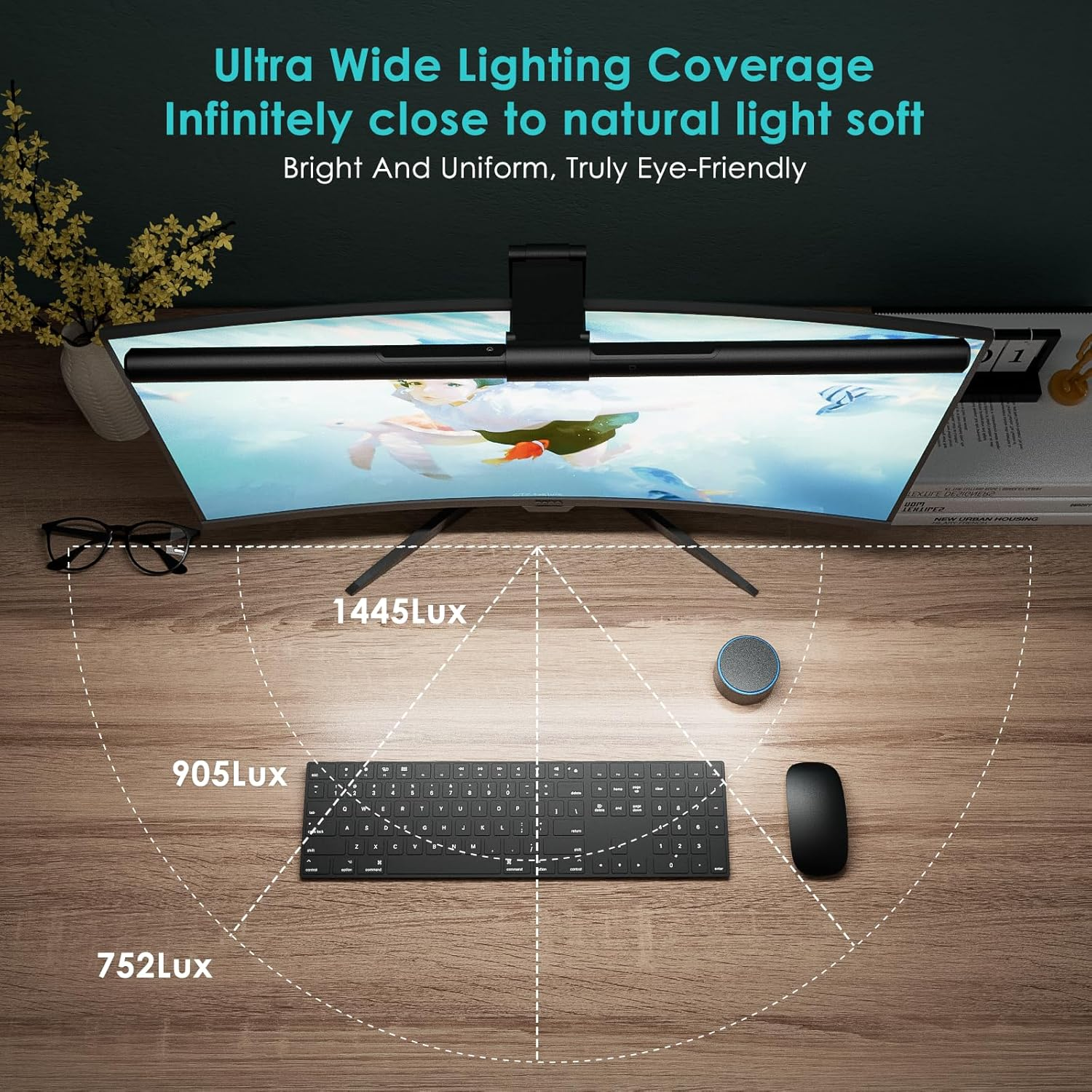
Length: 20 inches (51cm) — Ideal for 27" to 34" ultrawides.
CRI (Color Rendering Index): Ra >95 (Excellent color fidelity for designers).
Illuminance: Up to 1000 Lux at the center.
Color Temperature: 3000K (Warm) to 6500K (Cold) stepless adjustment.
Control: 2.4GHz Wireless Remote Puck.
Optics: 45° Asymmetrical Beam.
Power: USB-C (5V/1A).
Core Innovation: The "Asymmetrical" Reality Check
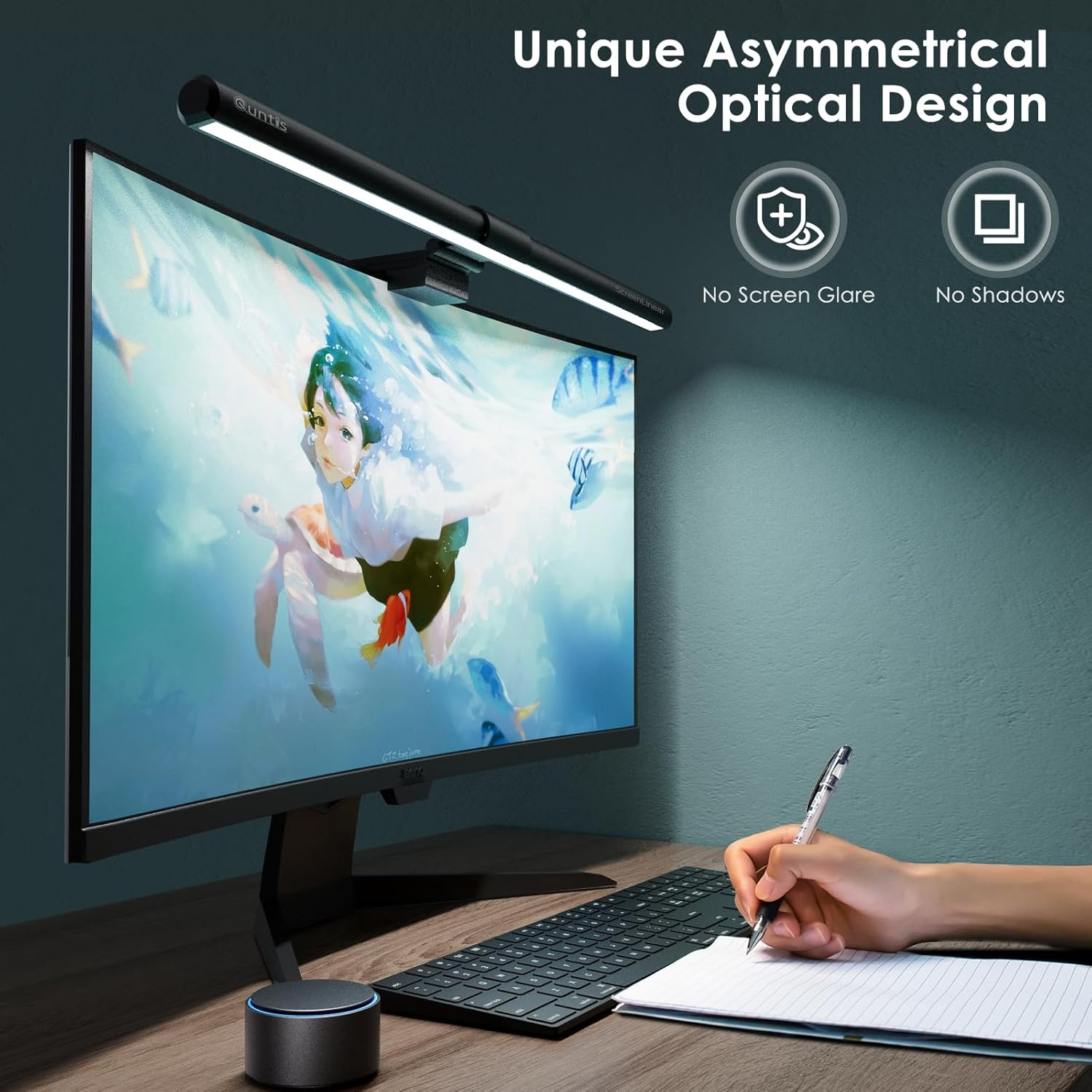
The reason we use a light bar instead of a $20 desk lamp is the optical cut-off. A standard lamp creates glare on the screen, which washes out your blacks and creates "veiling reflections."
The Quntis PRO+ uses a 45-degree asymmetrical design. In the lab, this means the light is sheared—it illuminates your keyboard, mousepad, and "analog task zone" but stops exactly at the glass of your monitor.
Observation: While the BenQ ScreenBar Halo still has the sharpest "shadow line" I've seen, the Quntis PRO+ gets 90% of the way there at 40% of the price. If you have an anti-reflective coating on your monitor, the difference in glare is virtually undetectable.
System Integration: The Wireless Puck
The defining feature of the "PRO+" model is the wireless controller. Reaching up to touch the top of your monitor is a friction point—it’s unergonomic and often causes the light bar to shift.
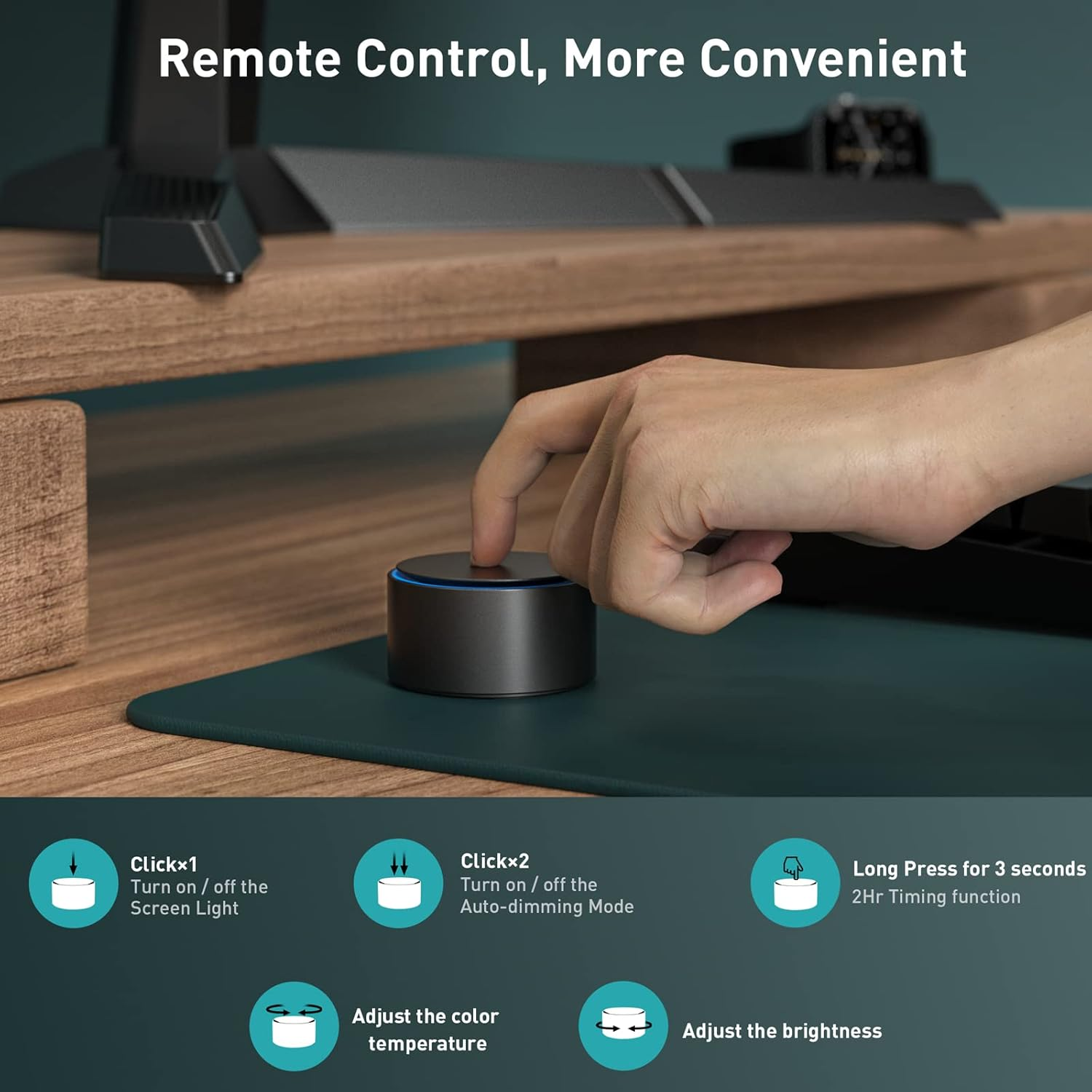
Interaction Design: The Quntis puck uses a rotating top for color temperature and a cylindrical body for brightness.
The "Feel" Factor: It has a weighted base and a glass-top interface. It feels surprisingly "non-budget."
System Logic: It includes an Auto-Dimming mode that uses an ambient sensor to target 500 Lux (the gold standard for office work) and a 2-hour Rest Timer that flashes the light to remind you to step away from the blue light—a primitive but effective "human-system" reminder.
Compatibility: The "Curved Monitor" Savior
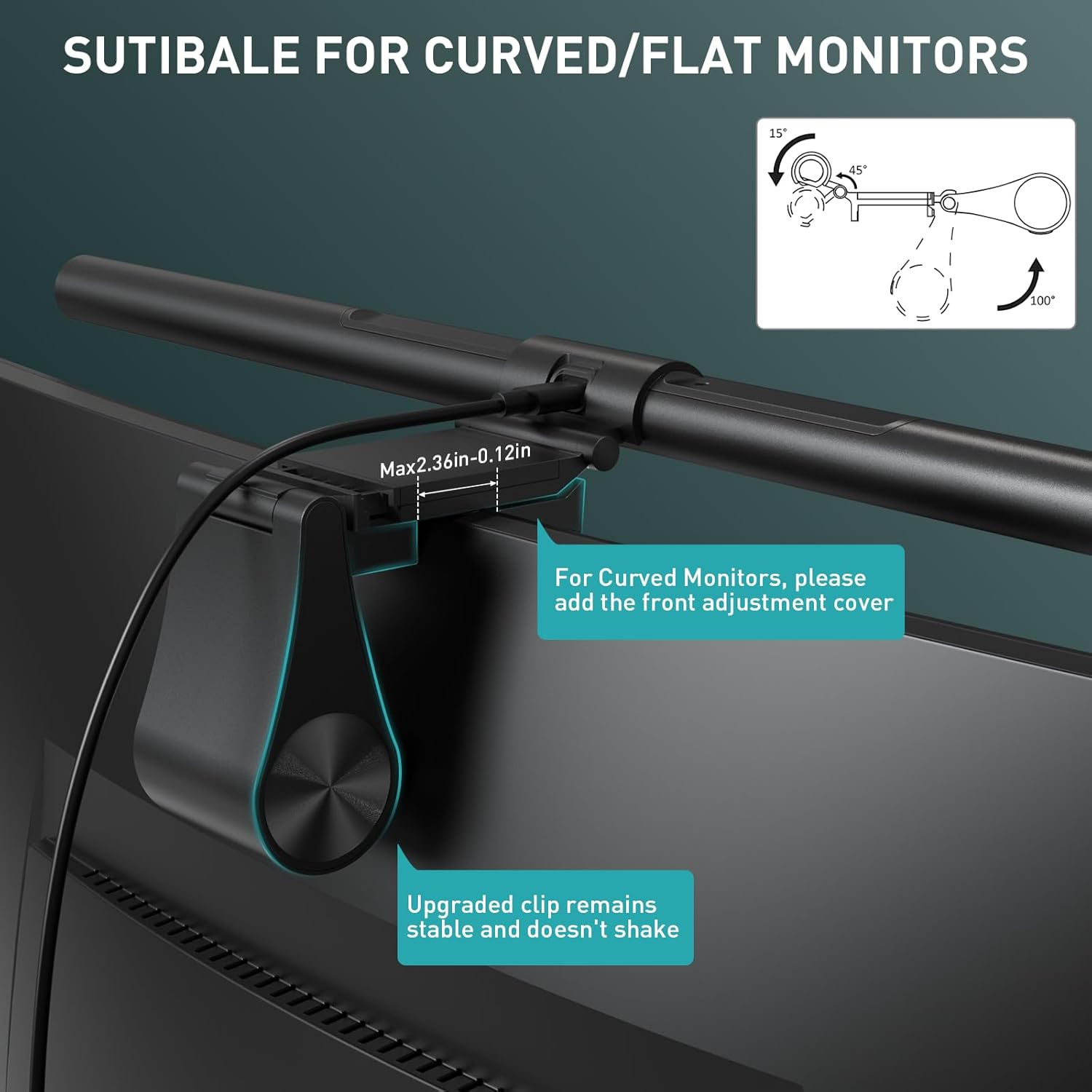
If you use a 1000R or 1500R curved monitor, many light bars fail because the ends of the bar "clip" the corners of the screen.
Quntis solves this with a sliding weighted clip. It includes several adjustment blocks and hex keys to tighten the hinges.
Ultrawide Performance: I tested this on a 34" curved display; the weighted counter-balance keeps it rock-solid even when adjusting the desk height on a Secretlab Magnus Pro. It clears the screen comfortably without obscuring the webcam area.
Comparison: Quntis PRO+ vs. BenQ ScreenBar Halo
For the developers, the decision usually comes down to these two.
Metric | Quntis PRO+ | BenQ ScreenBar Halo |
|---|---|---|
Optics | High-Grade Asymmetrical | Reference-Grade Asymmetrical |
Backlight | Rear Ambient (Warm/Cold) | Integrated "Halo" Ambient |
Remote | Mechanical/Touch Hybrid | Precision Proximity-Sensing Dial |
Build | Aluminum/Industrial Plastic | Full Premium Aluminum |
Price | ~$60 - $70 | ~$179 |
The Verdict: The BenQ is the superior "object." It feels like a piece of Leica hardware. However, from a Productivity System standpoint, the Quntis PRO+ provides the exact same eye-strain reduction and desk illumination for a fraction of the investment. If you aren't an "aesthetic purist," the Quntis is the smarter financial move.
Trade-offs & Practical Solutions
The "Whine": Some units emit a faint high-frequency whine when the controller's LEDs are active. It disappears after a few seconds when the lights time out, but sensitive ears should be aware.
Control Friction: The brightness dial requires more rotations than the BenQ to go from 0 to 100. It’s a minor UX lag, but if you change your lighting frequently, you’ll notice it.
Battery Dependency: The puck runs on 3x AAA batteries. I highly recommend using rechargeable NiMH batteries (like Eneloops) to prevent the "low battery" friction from breaking your workflow.
The Verdict: Who Should Buy?
The High-Performance Minimalist: If you want to clear your desk of bulky lamps but aren't ready to drop $200 on a single light.
The Curved Monitor User: The adjustment mechanism here is actually more versatile for varying thicknesses than many premium rivals.
The Student/Home Office Professional: If you work long hours and have noticed your eyes burning by the end of the day, this is the most "high-impact" $60 you can spend on your health.
Who should skip?
The All-Apple Aesthetic Purist: If your setup is all silver aluminum and Apple Studio Displays, the plastic components of the Quntis might feel like a downgrade. Stick to the BenQ or the ScreenBar Halo.
Final Thought: Quntis has managed to democratize a once-prohibitively expensive tool. The PRO+ isn't just a lamp; it’s a "Set and Forget" infrastructure upgrade.
Are you ready to stop working in a dark cave and start optimizing for your eyes?
Recommended Guides For You:
- The Best Monitors for Office Work in 2026: The Ultimate Productivity Tools
- Work Environment Setup Guide
- Roost V3 Review: Is This $90 Plastic Skeleton Actually the Best Portable Laptop Stand?
Disclaimer: This site participates in the Amazon Associates Program. As an Amazon Associate, we earn from qualifying purchases at no additional cost to you.