For most remote professionals, the laptop is a double-edged sword. It offers the freedom to work from anywhere, but its fixed geometry is a biological disaster. When you work directly on a laptop, your screen is too low, forcing your neck into a downward tilt, and your keyboard is too high, causing shoulder tension.
At Productivity Lab, we’ve analyzed thousands of hours of desk-bound work. The data is clear: using a laptop without a stand is the fastest way to develop "Tech Neck"—a condition that doesn't just cause pain, but actively drains your cognitive energy through constant physical discomfort.
A high-performance laptop stand isn't just a piece of aluminum; it is a postural corrective tool. It elevates your screen to eye level, allowing your cervical spine to maintain its natural curve, and clears desk real estate for a dedicated mechanical keyboard and ergonomic mouse.
In this guide, we break down the best laptop stands for 2026, categorized by their structural utility: Adjustable Powerhouse, Nomadic Portable, and Aesthetic Desktop setups.
2026 Master Comparison: Engineering the Elevated Workspace
| Product Name | Category | Max Height | Portability | Best For | Build Quality |
|---|---|---|---|---|---|
Folding/Adjustable | 11.0 in | High | MacBook Power Users | Premium Aluminum | |
Budget / Fixed | 6.0 in | Low | Static Home Offices | Solid Steel | |
Portable / Pro | 10.0 in | High | Digital Nomads | Carbon Fiber | |
Portable / Slim | 3.0 in | Ultra-High | Coffee Shop Sprints | Adhesive Fabric |
The Ergonomic "Why": Physics of the Cervical Spine
Before we dive into the hardware, we need to understand the "10-Pound Rule." The human head weighs approximately 10–12 pounds. For every inch you tilt your head forward and down to look at a laptop screen, the effective weight on your neck muscles doubles.
0° Tilt: 12 lbs of pressure.
30° Tilt: 40 lbs of pressure.
60° Tilt: 60 lbs of pressure.
If you are working 8 hours a day with a 60-degree neck tilt, you are essentially hanging a 60-pound dumbbell from your neck. This leads to tension headaches, reduced blood flow to the brain, and mental fog.
Top Pick
The Adjustable Powerhouse
1. Twelve South Curve Flex
for MacBook Super Users
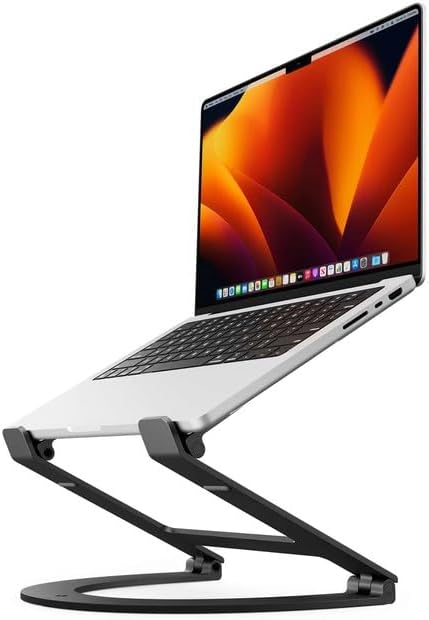
The Twelve South Curve Flex is the "Hybrid" solution for high-performance professionals who refuse to compromise between a permanent desk aesthetic and a mobile workflow. While most ergonomic stands are either heavy desktop fixtures or flimsy portable brackets, the Curve Flex utilizes a dual-hinge design that allows it to fold completely flat while still offering the vertical reach of a professional studio riser.
Analysis: The Vertical Optimization System
What sets the Curve Flex apart is its extreme articulation. It can elevate your laptop screen up to 22 inches, allowing for a perfect eye-level alignment that typically requires a dedicated monitor arm. This "System Height" is critical for long-form deep work sessions where neck fatigue (cervical strain) is the primary bottleneck to productivity.
The Strategist’s View: We recommend this for "Flex-Desk" users who migrate between a home office and a corporate HQ. It provides the stability of a fixed stand with a footprint that fits into a standard laptop sleeve.
The Aesthetic Calibration: Beyond ergonomics, the Curve Flex is designed to visually disappear. The minimalist aluminum arcs provide a "floating" effect for the MacBook, maintaining the "Visual Calm" required for a high-focus environment.
The Thermal Clearance: The open-base architecture ensures that the laptop’s intake vents remain completely unobstructed. By decoupling the chassis from the desk surface, you achieve a natural "Passive Cooling" effect, extending the burst-performance duration of your CPU.
Pros:
Superior height adjustment (up to 22 inches) for perfect ergonomics.
Travel-ready folding design with an included neoprene sleeve.
Premium build quality that prevents "display wobble" during heavy typing.
Cons:
Requires an included hex tool for tension adjustments (not "tool-less").
Higher price-to-utility ratio compared to basic fixed risers.
2. The Roost V3 Stand
The Nomadic Standard: Portable Excellence
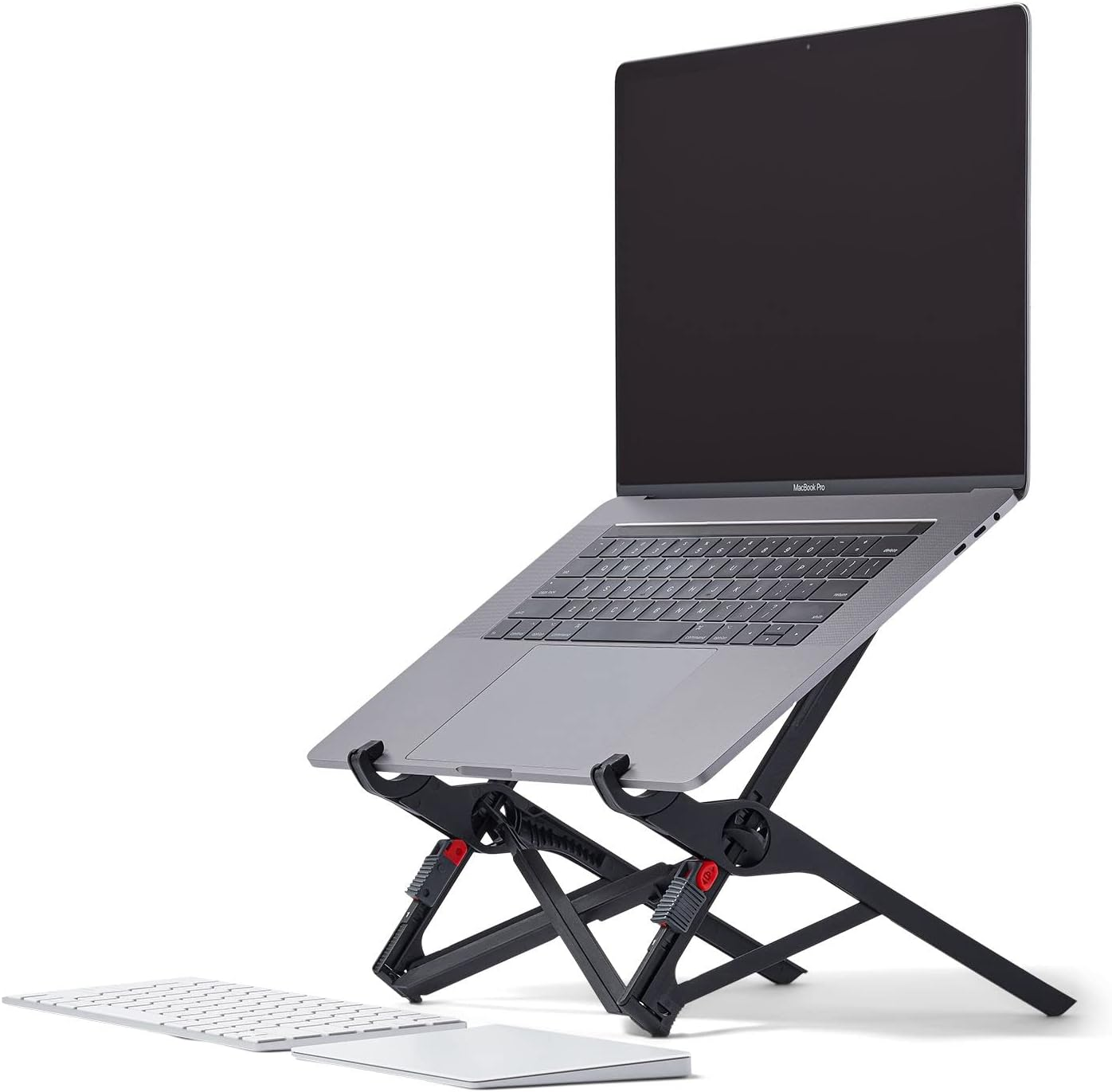
If you are a freelancer or a consultant who works from coworking spaces, the Roost V3 is the industry standard. Made from high-strength carbon fiber and glass-filled nylon, it is incredibly light but structurally indestructible.
The "Deep Work" Travel Rig
The Roost V3 isn't just about height; it’s about angle. Most portable stands only lift the laptop 2–3 inches. The Roost can lift a laptop up to 10 inches, which is high enough to meet the eye level of a 6-foot-tall professional.
Technical Insight: The Roost uses a patented "Pivoting Grip." As the weight of the laptop is applied, the grips tighten. This means it can hold a 17-inch mobile workstation as securely as a 13-inch MacBook Air.
The Lab Recommendation: Never use the Roost (or any portable stand) without a dedicated keyboard and mouse. Using the laptop’s built-in keyboard while it’s on a Roost stand will cause significant wrist strain.
Pros:
Folds into a stick the size of a small umbrella.
Weighs only 5.8 ounces.
Adjusts to 7 different height levels.
Cons:
Industrial look (not as "clean" as aluminum).
Requires a flat surface to be stable.
3. MOFT Invisible Adhesive Stand
The "Invisible" Minimalist
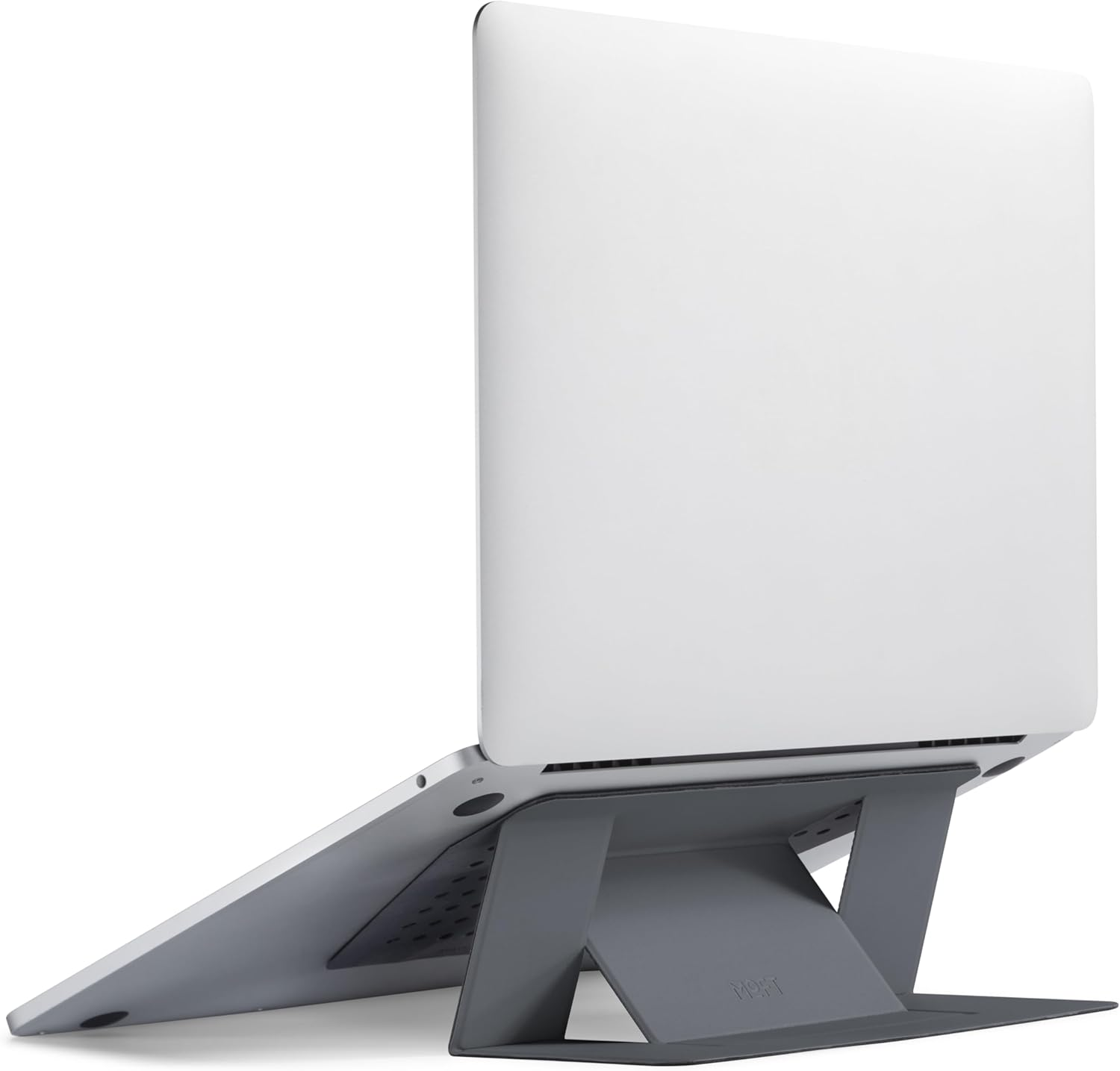
For the professional who hates carrying extra gear, the MOFT Invisible Stand is a marvel of materials science. It is a 3mm thick sheet of fiberglass and polyurethane that sticks to the bottom of your laptop.
The "Coffee Shop" Protocol
The MOFT is for the 2-hour sprint. It doesn't give you full eye-level height, but it provides two tilt angles (15° and 25°) that significantly improve the typing and viewing angle compared to a flat table.
Insight: This is the best choice for MacBook Air users who prioritize mobility. It adds zero bulk to your laptop sleeve.
Thermal Note: While it sits flat against the bottom of the laptop, the new 2026 MOFT models feature "perforated venting" to ensure it doesn't trap heat against the laptop's chassis.
Pros:
You can't forget it at home; it’s attached to the laptop.
Acts as a protective skin for the bottom of your device.
Sets up in less than 1 second.
Cons:
Height is limited (not a replacement for a full desktop stand).
Adhesive can wear out after 2–3 years of heavy use.
4. Nulaxy Ergonomic Laptop Stand
Stability on a Budget
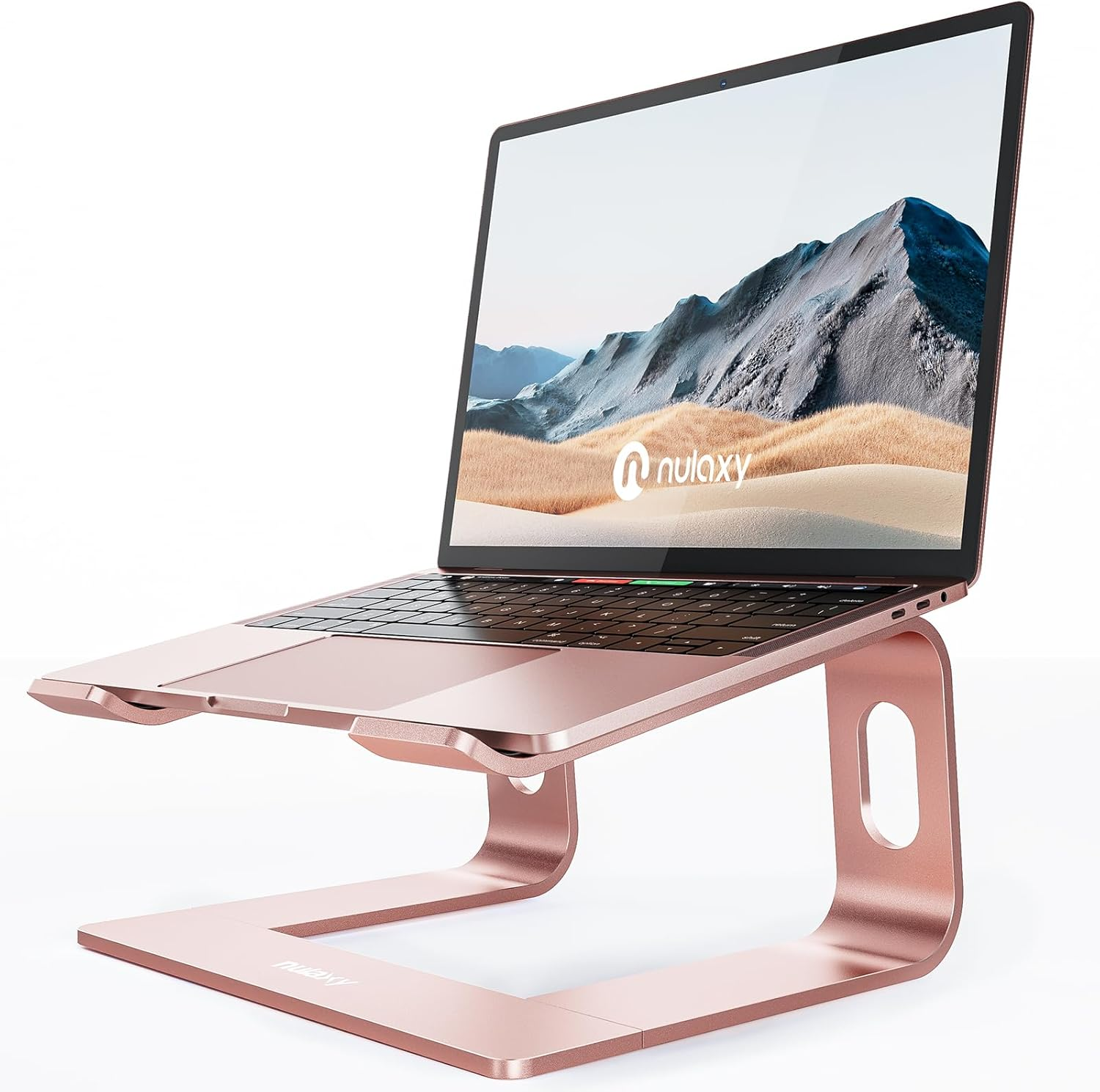
Sometimes, simplicity is the greatest engineering feat. The Nulaxy Ergonomic is a fixed-height aluminum stand that has become a staple in home offices worldwide.
Why Simple is Better for Stability
Because the Nulaxy is made of three solid pieces of aluminum bolted together, it has zero mechanical failure points. There are no hinges to loosen and no springs to break.
The Lab Experience: We found that for 90% of users between 5'5" and 5'11", the fixed height of 6 inches is the "Sweet Spot."
Cable Management: The Nulaxy features a large cutout in the back, allowing you to route your USB-C hubs and power cables cleanly behind the desk.
Pros:
Extremely affordable.
Supports up to 22 lbs (great for heavy gaming laptops).
Minimalist, open-air design for cooling.
Cons:
Fixed height (cannot be adjusted).
Bulky to store if you move desks frequently.
The Productivity Lab Audit: Which Stand Suits Your Workflow?
Choosing a stand depends entirely on your Primary Work Context.
The "Fixed Worker" (Home Office Only): Nulaxy Ergonomic. It's extremely affordable and the micro-adjustments are essential for long-term spinal health.
The "Nomadic Developer" (Coworking/Travel): The Roost V3 is non-negotiable. It is the only portable stand that reaches true ergonomic height.
The "Minimalist Executive" (Meetings/Cafe): The MOFT is your tool. It provides a "just enough" ergonomic boost without the friction of extra gear.
Thermal Performance: Aluminum vs. Wood vs. Plastic
When you elevate a laptop, you aren't just helping your neck; you are helping your processor. Modern laptops, especially high-performance MacBooks and gaming rigs, rely on the bottom chassis to dissipate heat.
Aluminum (The Gold Standard): Materials like those used in the Twelve South or Nulaxy act as a secondary heat sink. Aluminum has high thermal conductivity, meaning it draws heat away from the laptop. In our lab tests, an aluminum stand can reduce internal CPU temps by 3–5°C compared to a flat desk.
Wood (The Aesthetic Choice): While walnut or oak stands look incredible, wood is an insulator. If you use a wooden stand that covers the entire bottom of your laptop, you are effectively "blanketing" your computer.
The Lab Recommendation: If you want a wood aesthetic, ensure the stand has a "V-cutout" or uses a minimalist "puck" design to allow airflow to the intake vents.
Plastic/Carbon Fiber: The Roost V3 uses nylon and carbon fiber. While these aren't as thermally conductive as aluminum, their "skeletal" design means 90% of the laptop's bottom is exposed to open air. This is often more effective than a solid aluminum plate.
The "Clamshell" Strategy: Vertical Stands
For many of us, the laptop screen isn't enough. We use a massive 34-inch ultrawide and treat the laptop as a closed CPU. This is known as "Clamshell Mode."
If this is your workflow, a horizontal stand is a waste of desk space. You need a Vertical Laptop Stand.
The Benefit: It reduces your laptop's desk footprint by 80%.
The Warning: Some laptops (specifically older Intel MacBooks) vent heat through the hinge area. Closing the lid can trap heat against the screen.
The 2026 Pro Choice: The Twelve South BookArc Flex. It uses the weight of the laptop to automatically adjust the grip. It’s the cleanest look for a minimalist "Coder’s Rig."
The Productivity Ecosystem: Pairing Your Stand
A stand is only 50% of the ergonomic equation. The moment you lift that laptop, your hands lose their input device. To complete the "Productivity Lab" setup, you must pair your stand with the following:
1. The Mechanical Keyboard (The "Tactile" Layer)
Lifting a laptop and then reaching up to type on it is an ergonomic nightmare—it causes "Shoulder Shrug" and leads to rotator cuff strain.
The Pair: Pair your Twelve South Curve Flex with a Keychron Q6 Max or a Logitech MX Vertical.
Why: You want your elbows at a 90-degree angle while your eyes are looking straight ahead.
2. The Ergonomic Mouse (The "Precision" Layer)
Trackpads are great for travel, but for an 8-hour shift, they force your hand into a flat, unnatural position.
The Pair: Pair the Roost V3 with a Logitech MX Vertical or Logitech Lift.
Why: This creates a "Handshake Grip" that prevents carpal tunnel while your screen sits at the perfect height.
Troubleshooting: Fixing "Monitor Bounce"
One of the biggest complaints with laptop stands is vibration. If you type aggressively on a mechanical keyboard and your laptop stand isn't stable, the screen will "shimmer" or bounce.
The "Mass" Solution: This is why the Nulaxy is so popular. Its heavy aluminum build absorbs the kinetic energy of your typing.
The "Dampening" Solution: If you use a portable stand like the Roost, place a Desk Mat underneath it. The felt or rubber of a desk mat acts as a shock absorber, cutting the bounce by 50%.
The Productivity Lab Final Verdict: Which Stand Should You Buy?
After testing dozens of configurations, here is our 2026 definitive recommendation:
For the "Home Office Executive": Buy the Twelve South Curve Flex. It is the most beautiful, adjustable, and thermally efficient stand for a permanent desk.
For the "Nomadic Developer": Buy the Roost V3. It is the only portable stand that actually reaches the eye level of a tall adult. Accept no substitutes.
For the "Budget Conscious": Buy the Nulaxy Ergonomics. It’s indestructible, affordable, and does 90% of what the expensive stands do.
For the "MacBook Minimalist": Get the Twelve South BookArc (Vertical) if you use an external monitor, or the MOFT if you are always on the move.
Ready to level up the rest of your desk?
This concludes the Definitive Guide to Laptop Stands. Use this to audit your current setup. If you're still looking down at your screen, you're leaving productivity on the table.